
A cracked screen, failing battery, damaged charging port, or phone that suddenly refuses to switch on can disrupt an entire day. Many people depend on their smartphones for work, banking, navigation, appointments, and communication, so waiting several days for a repair is not always practical.
If you are looking for phone repair Cottonwood Heights services, speed matters—but it should not be the only consideration. A repair completed quickly is useful only when the diagnosis is accurate, the replacement part is suitable, and the work is backed by clear service terms.
Here is what to check before handing your device to a repair technician.
Identify the Problem Before You Visit
You do not need to diagnose the phone yourself, but noting the symptoms can save time.
For example, tell the technician whether:
- The screen is cracked but still responds to touch.
- The battery drains unusually quickly.
- The phone switches off at a certain battery percentage.
- The charging cable needs to be held at an angle.
- The device became wet before the problem appeared.
- The camera, microphone, speaker, or buttons have stopped working.
Small details can help a repair technician narrow down the problem and provide a more realistic estimate.
Ask Whether the Repair Can Be Completed the Same Day
Common repairs may sometimes be completed within a few hours when the required part is already available. Screen replacement and battery replacement are generally simpler than repairs involving water damage, motherboard problems, or complex internal faults.
When searching online for phone repair near me, ask the shop about turnaround time before traveling there.
A useful question is:
“Do you currently have the part for my exact phone model, and how long does this repair normally take?”
This is more helpful than simply asking whether the shop offers “fast repairs.”
Confirm the Total Price First
A low advertised price may not always represent the final amount.
Before approving the repair, ask whether the quoted price includes:
- Replacement parts.
- Labor.
- Diagnostic charges.
- Taxes.
- Any additional service fees.
You should also ask whether the diagnostic fee still applies if you decide not to proceed.
Clear pricing helps you compare repair options fairly and prevents unexpected charges at collection.
Ask What Type of Replacement Part Will Be Used
Not all replacement parts are identical.
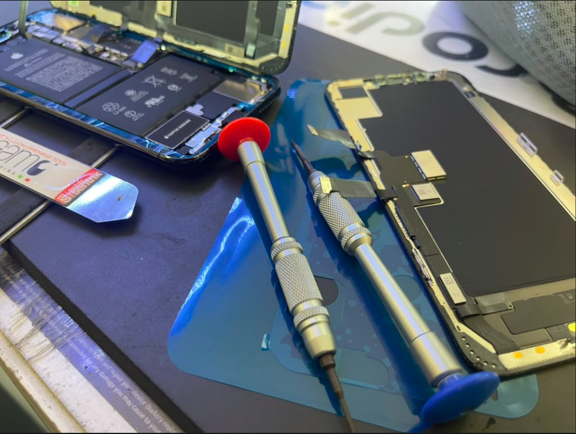
For screen repairs, for example, shops may use different grades of aftermarket components depending on the device. Quality can affect brightness, color accuracy, touch response, durability, and overall appearance.
Instead of assuming that every screen replacement is the same, ask what type of part is being installed and whether different options are available.
The least expensive repair is not necessarily the best value if the replacement component performs noticeably worse than the original.
Check Whether There Is a Repair Warranty
A reputable repair business should clearly explain whether its work comes with a warranty.
Ask:
- How long does the repair warranty last?
- What problems does it cover?
- Does it cover both the part and labor?
- What situations are excluded?
For example, a replacement-screen warranty may cover a component defect but not damage caused by dropping the phone again.
Understanding the terms before the repair makes future problems easier to resolve.
Back Up Important Data
Whenever possible, back up photos, contacts, messages, documents, and other important information before leaving your phone for repair.
Most routine repairs should not affect stored data, but unexpected hardware problems can occur.
Cloud backups or a computer backup provide an additional layer of protection if something goes wrong.
If the device will not switch on, tell the technician that data preservation is important before authorizing more extensive work.
Protect Your Personal Information
Modern phones contain an enormous amount of private information.
Depending on the repair, technicians may not need access to your personal apps or files. Ask whether the phone needs to be unlocked and why.
You can also remove sensitive notifications from the lock screen, log out of particularly sensitive accounts where appropriate, or use built-in repair or maintenance modes if your device supports them.
Never provide passwords for banking or unrelated services simply because your phone is being repaired.
Decide Whether Repair Still Makes Financial Sense
Not every damaged phone should automatically be repaired.
Consider the phone’s age, general condition, repair cost, battery health, storage capacity, and expected useful life.
For example, replacing a screen on a relatively recent device that otherwise works well may be worthwhile. Spending heavily on several repairs for an older phone with poor battery performance may be less sensible.
Ask for a written estimate before making the decision.
Check the Phone Before Leaving
Once the repair is finished, spend a few minutes testing the device.
Check the:
- Touchscreen
- Display brightness.
- Front and rear cameras.
- Microphone.
- Speakers.
- Charging connection.
- Buttons.
- Face or fingerprint recognition, where applicable.
It is easier to raise a concern while you are still at the repair shop than after returning home.
Conclusion
Fast phone repair should combine convenience with careful workmanship. Before choosing a repair provider in Cottonwood Heights, confirm the turnaround time, complete price, replacement-part quality, warranty terms, and data-handling process.
Taking a few minutes to ask the right questions can help you avoid poor-quality repairs and unexpected charges. A local workshop such as Dr Riing in Cottonwood Heights can walk you through each of these points before any work begins. The goal is not simply to get the phone back quickly, but to get it repaired properly so you can continue using it with confidence.